Web Indexer Guide 2026: Faster Indexing, Smarter Choices
Learn how a web indexer speeds up Google indexing with expert tips on crawlability, sitemaps, APIs, and troubleshooting for faster, reliable search visibility.

Getting a page published is the easy part. Getting it discovered, crawled, and actually added to a search engine's database? That's where a web indexer enters the picture and one of the best and cheapest on the market is Zindexing. If you've ever hit publish and then refreshed Google like a caffeinated raccoon, waiting for your page to appear... yeah, you're not alone.
In plain English, a web indexer helps search engines or internal systems organize web content so it can be found later. Sometimes that means Google's own indexing systems. Sometimes it means tools that submit URLs, monitor crawl activity, or automate indexing workflows at scale. And sometimes it means building your own indexing pipeline for a site, an app, or an enterprise knowledge base.
This guide keeps the scope practical. You'll learn what a web indexer is, how indexing works, which signals matter most, what tools are worth your time, and how to troubleshoot the annoying stuff, canonical mistakes, robots blocks, JS rendering issues, and crawl budget waste. I'll also cover where third-party "instant indexing" claims deserve skepticism. Some services advertise ultra-fast indexing and rock-bottom pricing, but no outside tool can honestly guarantee that Google will index every URL just because you paid for a batch submission.
If your goal is to get pages indexed faster, more reliably, and with fewer surprises, you're in the right place. Let's start with the basics, then move into the workflows and tools that actually help.
Key Takeaways
- A web indexer organizes and stores web content to ensure faster and more reliable discovery by search engines or internal systems.
- Improving crawlability through strong internal links, clean sitemaps, and fixing broken links significantly speeds up indexing.
- Utilize official tools like Google Search Console and Bing Webmaster Tools for submitting sitemaps, monitoring indexing status, and troubleshooting issues.
- Indexing APIs (e.g., Google Indexing API) enable automation but don’t guarantee faster indexing beyond search engine quality controls.
- Regularly audit your site’s technical signals—robots.txt, canonical tags, meta robots, and server responses—to avoid indexing problems.
- Automate bulk URL submissions and monitor crawl logs to track crawler activity and measure indexing success effectively.
What is a web indexer? Definition, purpose and user intent

A web indexer is a system or tool that processes web pages and stores searchable records about them. Its job is to make content retrievable later, whether by a public search engine, an internal site search, or a private enterprise platform. The user intent behind searching this term is usually practical: you want pages indexed faster, better monitored, or more controllable.
Search engine indexers vs third‑party indexer tools vs custom/indexing pipelines
Search engine indexers are Google, Bing, and similar engines building massive search databases. Third-party indexer tools usually help with submission, monitoring, pinging APIs, or surfacing indexation issues, they don't control Google's final decision. Custom indexing pipelines are built by companies for internal search, vertical search, marketplaces, docs portals, or compliance archives.
Who needs a web indexer, site owners, SEOs, developers and enterprises
If you run a blog, store, SaaS site, newsroom, or docs center, you need some form of indexing workflow. SEOs use web indexer tools to improve discovery and diagnose coverage issues. Developers care about rendering, canonicals, status codes, and automation. Enterprises often need custom pipelines for internal content, permissions, and auditability.
How a web indexer works: crawling, parsing, indexing and serving
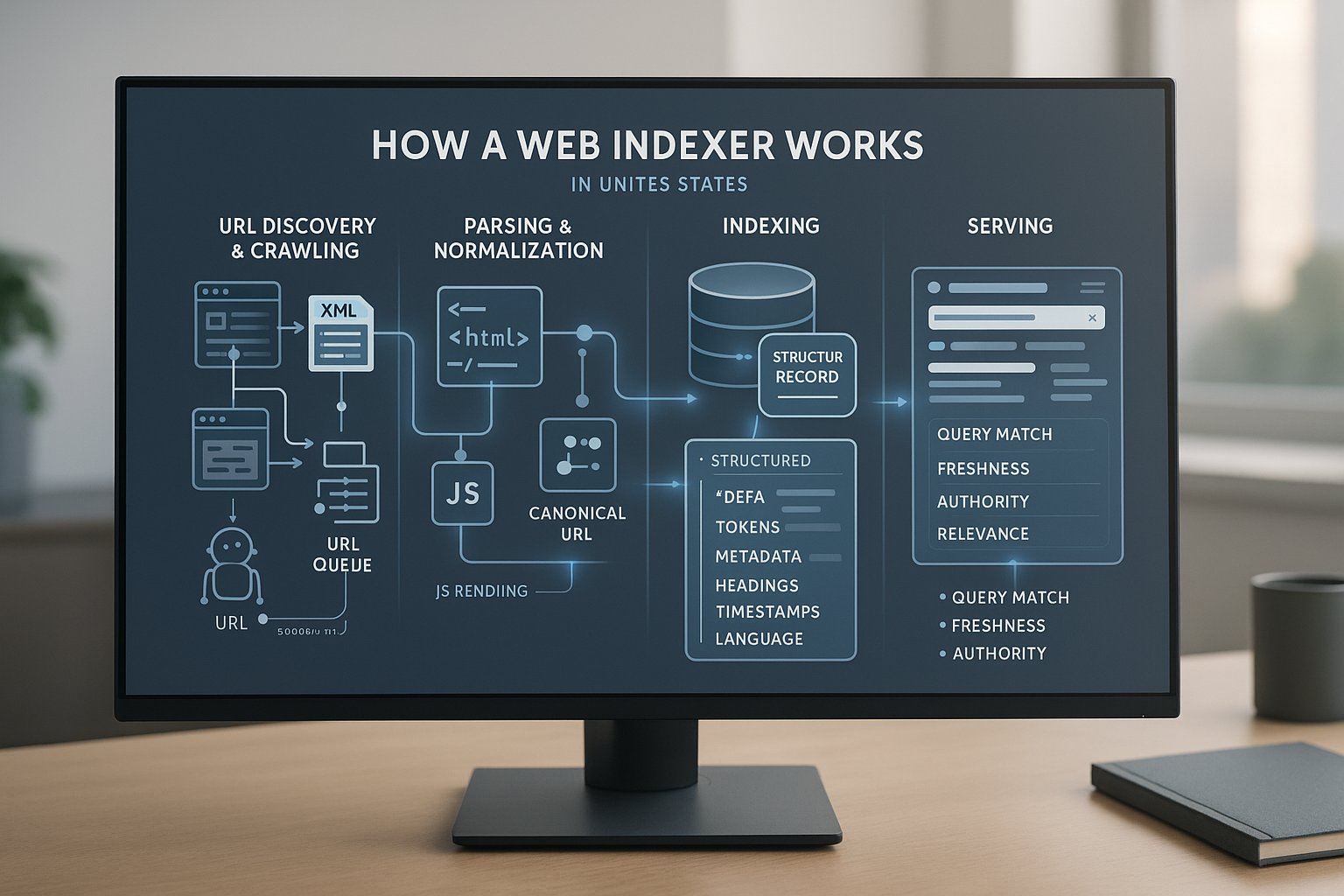
At a high level, a web indexer follows four stages: discover URLs, fetch content, interpret it, and store retrievable records. Then those records are matched to queries later. Sounds simple. In practice, each stage has edge cases, tradeoffs, and failure points.
Crawling: discovery, URL frontier and politeness
Crawlers discover URLs through links, XML sitemaps, feeds, APIs, redirects, and prior crawl history. A URL frontier prioritizes what gets fetched next. Politeness rules matter: good crawlers respect robots.txt, rate limits, crawl delays where applicable, and server capacity, so they don't melt your site at 2 a.m.
Parsing and normalization: HTML, JS rendering, structured data and canonicalization
After fetching, the system parses HTML, headers, links, metadata, and structured data. Some pages need JavaScript rendering before meaningful content appears. Normalization cleans URLs, resolves canonicals, removes duplicate parameters, and standardizes records so multiple URL variants don't pollute the index.
Indexing: tokens, metadata, signals and ranking-ready records
The content is then transformed into indexable fields, tokens, titles, headings, body text, schema data, language hints, freshness timestamps, media references, and link signals. Search engines also attach quality and relevance signals. The result is a structured, ranking-ready record rather than a raw HTML file.
Serving: query matching, freshness and relevance
When someone searches, the engine retrieves candidate records that match the query, then sorts them using relevance, quality, authority, freshness, location, device context, and intent. If your content wasn't crawled correctly or indexed cleanly, it never really gets a shot in this stage.
Key signals and components a web indexer uses
Indexing isn't random. A web indexer relies on technical directives, site structure, page-level metadata, and performance cues to decide what to fetch, interpret, consolidate, and store. If those signals conflict, indexing slows down, or goes sideways in very annoying ways.
Sitemaps, robots.txt and Index directives (noindex, canonical, hreflang)
XML sitemaps help search engines discover preferred URLs and last-modified dates. robots.txt controls crawler access, but it doesn't remove already indexed pages by itself. noindex tells engines not to keep a page in the index. Canonical tags consolidate duplicates. hreflang helps map regional or language variants.
On‑page metadata, structured data and semantic markup
Title tags, meta descriptions, headings, image alt text, and schema markup all help a web indexer understand page purpose. Structured data won't force indexing, but it can reduce ambiguity. Clear semantic markup also improves extraction, especially for products, articles, FAQs, events, and local business details.
Internal & external links, crawl budget and site architecture
Internal links remain one of the strongest discovery and prioritization signals. If a page is buried six clicks deep with no meaningful links, don't expect miracles. External links can prompt discovery too. Clean architecture, logical navigation, and limited orphan pages make crawl budget go further.
Performance signals: page speed, mobile‑first and HTTP status codes
Slow pages, broken mobile layouts, and flaky server responses can suppress crawl efficiency. Search engines largely use mobile-first indexing, so your mobile rendering matters. HTTP status codes are foundational: 200 for success, 301 for moved content, 404 for missing pages, and 5xx for server trouble.
Popular web indexer tools and services (comparison and when to use each)
The term web indexer covers a mixed bag: webmaster platforms, APIs, third-party submission tools, and crawlers that diagnose indexation health. They serve different jobs. Choosing the wrong category is like bringing a butter knife to assemble IKEA furniture, technically possible, emotionally costly.
Search console tools: Google Search Console, Bing Webmaster Tools
These should be your starting point. Google Search Console lets you submit sitemaps, inspect URLs, monitor coverage, and review indexing status. Bing Webmaster Tools offers similar capabilities, plus crawl control and URL submission features. They're official, free, and essential.
Indexing APIs and official endpoints (Google Indexing API, Bing URL Submission API)
Official APIs are best for automation. Google's Indexing API is intended primarily for job posting and live stream pages, even though widespread experimentation beyond that scope. Bing's URL Submission API supports direct notifications for new or updated URLs. If you publish at scale, these endpoints can seriously reduce lag.
Third‑party instant indexers and bulk indexers (what they actually do)
Third-party services usually submit URLs through available endpoints, browser automation, ping methods, sitemap generation, link discovery, or proprietary workflows. Some are useful for operations. But be careful with bold claims like guaranteed indexing in 60 seconds or universal acceptance at a fixed per-URL price. They can speed submission, not override Google's quality thresholds.
Crawlers & audit tools for indexing health: Screaming Frog, Sitebulb, Ahrefs, SEMrush
These tools don't index pages into Google: they help you understand why pages aren't indexing well. Screaming Frog, Sitebulb, Ahrefs, and Semrush can surface broken canonicals, redirect chains, orphan pages, duplicate titles, soft 404s, and noindex mistakes.
Step‑by‑step: How to index a website using a web indexer (practical walkthrough)
If you want a practical path, start with site health, then submit discovery signals, then automate where it makes sense. Most indexing failures are not "submission problems." They're quality, crawlability, duplication, or rendering problems wearing fake mustaches.
Preparation: site audit, sitemap, canonicalization and robots review
Audit the site first. Confirm important pages return 200, are internally linked, and aren't blocked by robots.txt or meta noindex. Review canonical tags for consistency. Generate a clean XML sitemap containing only index-worthy URLs. If staging URLs leaked, fix that before doing anything else.
Submitting sitemaps and individual URLs to Google & Bing
Submit your sitemap in Search Console and Bing Webmaster Tools. For priority pages, new product launches, cornerstone articles, category hubs, use URL inspection or direct submission features where available. This won't guarantee indexing, but it improves discovery speed and gives you diagnostic visibility.
Using an indexing API: request flow, sample calls and common parameters
An indexing API workflow is simple: authenticate, send the target URL, specify whether it's new, updated, or deleted, and log the response. Common implementation pieces include service accounts, OAuth, JSON payloads, endpoint validation, retries, and rate-limit handling. Keep request logs so you can compare submissions against actual indexation.
Bulk indexing workflows and automation (CSV, API, webhooks)
For large sites, build a bulk pipeline. Export changed URLs from your CMS, feed them via CSV or queue, call the API, then record timestamps and outcomes. Webhooks are even better: when a product changes price or stock, your system can automatically trigger resubmission. Less manual clicking, fewer forgotten URLs.
How to speed up indexing with a web indexer: proven tactics
You can't force indexing, but you can remove friction. Faster indexing usually comes from better crawlability, clearer page signals, and stronger discovery pathways, not from magical software with a very loud landing page.
Improve crawlability: internal linking, sitemap hygiene and removing dead links
Link to new pages from strong hubs such as home, category, tag, or resource pages. Keep XML sitemaps current and free of redirected, canonicalized, or noindex URLs. Fix dead links. A search crawler that keeps tripping over broken pathways will spend less time on the pages you actually care about.
Minimize crawl budget waste: parameter handling, pagination and noindex strategy
Trim faceted navigation junk, duplicate parameters, session IDs, and infinite crawl traps. Use canonicals and robots rules carefully, and noindex low-value pages such as filtered duplicates where appropriate. Paginated content should remain discoverable. Waste less crawler attention on nonsense, and better pages get processed sooner.
Use structured data, frequent content updates and social/PR signals
Updating stale content can trigger recrawls, especially when changes are meaningful. Structured data adds clarity. Social sharing, email traffic, and digital PR links can accelerate discovery indirectly by increasing visibility and external linking. Not a silver bullet, but definitely not useless.
Monitoring indexing status and measuring success
Once you start using a web indexer workflow, measure outcomes. Otherwise you're just tossing URLs into the void and hoping the algorithm feels generous that day.
Index Coverage reports, URL Inspection, and Search Console alerts
Coverage reports show which pages are indexed, excluded, crawled but not indexed, or blocked. URL Inspection gives page-specific detail on crawl, canonical selection, and live-test fetchability. Search Console alerts can help you spot sudden spikes in exclusions before they turn into a traffic cliff.
Server logs, crawl logs and log analysis to verify crawler activity
Server logs reveal whether Googlebot and Bingbot actually hit the URLs you submitted. This is huge. If there's no crawler activity, your issue is discovery or access. If crawlers visit but pages still don't index, look harder at content quality, duplication, rendering, or canonical conflicts.
KPIs: indexation rate, time‑to‑index, organic clicks and impressions
Track percentage of important URLs indexed, median time from publication to indexation, and downstream outcomes like impressions, clicks, and landing-page sessions. Segment by template type, products, blogs, docs, location pages, because one global metric can hide very specific technical failures.
Common indexing problems and how to troubleshoot them
Most indexing issues come down to a handful of repeat offenders. The frustrating part? They often stack. One page can be canonicalized away, blocked in robots, and rendered poorly, all at once. Overachieving, but in the worst way.
Blocked by robots.txt or meta noindex, detection and fixes
Check robots.txt first, then inspect page-level meta robots and X-Robots-Tag headers. If a valuable page is blocked, remove the disallow or adjust the rule. If it carries noindex, update the directive and request recrawl. Don't leave conflicting signals in place.
Canonicalization mistakes, duplicate content and soft 404s
Pages with self-defeating canonicals often disappear from the index in favor of other versions. Duplicate titles, near-identical template text, or thin variants can also get folded together. Soft 404s happen when a page technically returns 200 but offers little or error-like content. Strengthen uniqueness and fix template logic.
JavaScript rendering issues and how to validate indexed content
If your content appears only after JS execution, test whether crawlers can render it. Use URL Inspection, rendered HTML views, and browser dev tools. Important text, links, and metadata should ideally exist in initial HTML or server-side rendering. If not, indexing may lag or miss core content.
Rate limits, temporary server errors (5xx) and crawl budget throttling
Frequent 429 or 5xx responses tell crawlers to back off. Shared hosting, overloaded app servers, or bad deploys can quietly wreck indexing speed. Monitor uptime, log spikes, and response times. If crawler traffic causes strain, tune caching, queue workloads, and stabilize the infrastructure first.
Security, privacy and compliance considerations for web indexers
A web indexer should help expose the right content, not accidentally publish private material to the world. This is where technical SEO meets legal, security, and "please don't leak the staging customer list" reality.
Handling private or authenticated pages and sensitive data
Pages behind logins, paywalls, admin panels, order histories, dashboards, and internal search results need deliberate protection. Use authentication, proper access controls, noindex where relevant, and avoid exposing private URLs through public sitemaps. Sensitive data should never rely on robots.txt alone for protection.
Respecting robots directives and legal/privacy restrictions (GDPR, CCPA)
Robots directives should be honored by responsible crawlers, especially internal or enterprise systems you control. For compliance, assess whether indexed content contains personal data, consent-limited materials, or regional privacy obligations. GDPR and CCPA considerations may affect what gets stored, surfaced, retained, or deleted on request.
Choosing the right web indexer: criteria, pricing and feature checklist
The best web indexer depends on what you actually need: discovery, diagnostics, API automation, or a private search system. Price matters, sure. But speed claims without visibility, logs, and compliance details are where budgets go to die.
Speed vs coverage vs cost: tradeoffs by site size and complexity
Small blogs may only need free search console tools and a solid sitemap. Mid-size e-commerce sites benefit from crawl auditing plus URL submission automation. Enterprise publishers care about throughput, permissions, reporting, SLA expectations, and change tracking. Cheap per-URL pricing can look great until coverage quality is poor.
Essential features: API access, bulk uploads, automation and reporting
Look for API access, batch submission, webhook support, retry logic, status logging, and clear reporting. You want to know what was submitted, when, for which page type, and what happened next. If a tool can't prove activity or outcomes, it's mostly vibes.
Recommended tools by scenario: blog, e‑commerce, news, enterprise
For blogs: Search Console, Bing Webmaster Tools, and a site crawler are usually enough. For e-commerce: add automation and log analysis. For news: fast sitemap updates, Google News compliance, and rapid recrawl signals matter. For enterprise: custom pipelines, APIs, and governance become non-negotiable.
When not to index: content and pages that should remain out of the index
Not every page deserves search visibility. In fact, indexing everything is a common mistake. You want the index to contain useful, unique, search-worthy URLs, not the digital junk drawer.
Noindex use cases: staging, duplicate content, internal search results and admin pages
Use noindex for staging environments, admin screens, duplicate or near-duplicate utility pages, filtered internal search results, thank-you pages, and account areas. If a page adds no standalone search value or creates confusion, keep it out. Cleaner indexes usually perform better.
Advanced: building a custom web indexer (architecture & best practices)
If you're building your own web indexer, you're not trying to "beat Google." You're solving an internal search, content discovery, marketplace, or documentation problem. Different goal, very different architecture.
Core components: crawler, parser/renderer, indexer, query engine
A custom stack usually includes a crawler for discovery and fetching, a parser or renderer for extracting meaningful content, an indexer that writes normalized records into storage, and a query engine that retrieves results fast. Tools vary: Elasticsearch, OpenSearch, Solr, Vespa, or custom vector pipelines.
Scaling, deduplication, incremental indexing and delta updates
At scale, reprocessing everything is wasteful. Use incremental indexing so only changed content gets refreshed. Deduplicate near-identical records, store content hashes, and build delta update pipelines. This improves freshness while lowering infrastructure cost and processing time.
Politeness, distributed crawling and scheduling strategies
Distributed crawling needs queue management, host-level rate control, retry policies, and crawl scheduling based on change frequency. News pages may need minute-level refreshes: legal archives, not so much. Good schedulers balance freshness goals with infrastructure cost and target-site courtesy.
Case studies, examples and sample snippets
A concrete example makes all of this less abstract. So let's do one that feels painfully real: a site launches a large batch of product pages and wants them discovered quickly, without creating a mess.
Example: submitting 1,000 product pages for indexing, workflow and expected results
Start with validation: each product URL returns 200, has unique copy, proper canonicals, and is linked from category pages. Add them to the XML sitemap, submit the sitemap, then batch-submit changed URLs through Bing's API and priority-inspect key templates in Google Search Console. Expect staggered indexing over days, not magic in one minute.
Sample robots.txt, sitemap.xml and a basic Google Indexing API curl example
User-agent: *

Disallow: /admin/

Disallow: /cart/

Sitemap: https://example.com/sitemap.xml
<url>

<loc>https://example.com/product/widget-1</loc>

<lastmod>2026-06-02</lastmod>

</url>
curl -X POST "https://indexing.googleapis.com/v3/urlNotifications:publish" \
-H "Content-Type: application/json" \
-d '{"url":"https://example.com/job/123","type":"URL_UPDATED"}'
Use Google's API only within supported use cases and authenticated workflows.
30‑point web indexer checklist: prepare, submit, monitor and optimise
Use this as your compact operating checklist:
- Confirm important pages return
200. - Remove accidental
noindex. - Review robots.txt.
- Fix broken canonicals.
- Resolve redirect chains.
- Strengthen internal links.
- Eliminate orphan pages.
- Validate mobile rendering.
- Improve page speed.
- Check structured data.
- Generate a clean XML sitemap.
- Exclude non-indexable URLs from sitemaps.
- Add lastmod where useful.
- Submit sitemap to Google.
- Submit sitemap to Bing.
- Inspect priority URLs.
- Configure API access if eligible.
- Log every submission.
- Batch changed URLs.
- Use webhooks for updates.
- Monitor coverage reports.
- Watch crawler activity in logs.
- Track time-to-index.
- Track indexation rate by template.
- Review duplicate content clusters.
- Investigate soft 404s.
- Stabilize
5xxerrors. - Keep low-value pages out.
- Refresh important stale content.
- Re-audit monthly.
Frequently asked questions about web indexer (FAQ)
Here are the questions most people ask after trying to get pages indexed faster and discovering, with mild despair, that submission is only half the battle.
How long does it take for a web indexer to index a page?
It depends on the engine, site authority, crawl demand, content quality, link discovery, and technical accessibility. Some pages are crawled within minutes: others take days or weeks. A web indexer can speed up discovery and submission, but it can't force inclusion if the page looks weak or duplicative.
Do indexing services guarantee indexing on Google/Bing?
No reputable service can honestly guarantee indexation on Google or Bing. They can improve discovery, automate submissions, and identify blockers. Final indexing decisions remain with the search engine. Treat hard guarantees, especially mass guarantees, with caution.
Are instant indexers safe and compliant with search engine policies?
Some are harmless workflow tools: others rely on aggressive or questionable tactics. Safety depends on what the service actually does, whether it follows official APIs and webmaster guidelines, and how transparent it is about methods. If a provider is vague, that's your clue.
Conclusion and next steps — audit template and recommended quick wins
A web indexer is most useful when you treat it as part of a system, not a shortcut. The winning pattern is simple: make pages crawlable, remove conflicting signals, submit discovery paths, automate what changes often, and monitor what search engines actually do, not what a sales page promises.
If you want quick wins, start here this week:
- Audit robots.txt, meta robots, canonicals, and status codes.
- Clean your XML sitemap so it includes only index-worthy
200URLs. - Strengthen internal links to new and high-value pages.
- Submit your sitemap in Google Search Console and Bing Webmaster Tools.
- Track time-to-index and indexation rate by page type.
- Review logs to confirm crawler activity.
That combination beats hype almost every time. And if you're evaluating a third-party web indexer, ask hard questions: Does it use official APIs? Can it show logs? Does it respect compliance requirements? Can it prove outcomes beyond "submitted"? If the answer is fuzzy, keep your wallet in your pocket.
Get the fundamentals right, and indexing usually gets faster, cleaner, and far less mysterious.