SEO Indexer Explained: Best Tools, Results & Risks in 2026

If you've ever published a page, refreshed Google Search Console 14 times, and whispered "please index already," you're in the right place. An seo indexer is one of those tools people hear about right after they realize publishing a URL and getting it discovered are... very much not the same thing.
Here's the short version: indexers can help search engines discover pages and backlinks faster, but they're not magic, and they definitely don't guarantee rankings. That matters because a lot of tools promise the moon, then deliver a polite shrug.
In this guide, you'll get a grounded, no-hype look at what an seo indexer does, how search engines actually crawl and index pages, which tools are worth your attention, and where beginners usually trip over their own shoelaces. I'll also cover realistic timelines, pricing, proxy considerations, and why Zindexing is often the best option if you want a cleaner, SaaS-style workflow without turning your browser tabs into a survival game.
If you're a solo site owner, affiliate marketer, in-house SEO, or agency operator, this article is built to help you make better indexing decisions, with fewer myths, less guesswork, and no "just blast 10,000 links and pray" nonsense.
Key Takeaways
- An SEO indexer helps speed up URL discovery and indexation by nudging search engine crawlers through various methods like sitemap pushes and API submissions but does not guarantee rankings.
- Effective use of an SEO indexer requires ensuring pages are fully indexable with proper robots settings, quality content, and internal linking before submission.
- Indexers are most valuable for quickly indexing new pages, backlinks, and time-sensitive content, helping reduce waiting times for search engines' natural crawling process.
- Choosing the right SEO indexer tool involves considering factors like indexation success rates, bulk limits, proxy support, API access, and ease of use, with SaaS options like Zindexing being suitable for most users.
- Automation and integration with workflows (via APIs, CMS plugins, or webhooks) can greatly enhance indexing efficiency and save time for site owners and agencies.
- Avoid black-hat tactics with SEO indexers; focus on white-hat strategies and respect search engine rules to maintain site safety and reputation.
What is an SEO Indexer?

Definition and core purpose
An seo indexer is a tool or service designed to help search engines discover URLs faster. Usually, that means nudging crawlers through sitemaps, pings, feeds, link discovery, or API-based submission where allowed. The goal isn't to force Google's hand: it's to improve the odds and speed of indexation.
User intent: who uses indexers and why
You'll usually see indexers used by:
- SEOs publishing lots of new pages
- Agencies managing multiple client sites
- Link builders tracking backlink discovery
- News, event, or seasonal publishers with time-sensitive content
In plain English: people use an seo indexer when waiting passively feels too slow.
How Search Engines Actually Crawl & Index Pages (Simple Technical Overview)
Crawling vs indexing vs serving
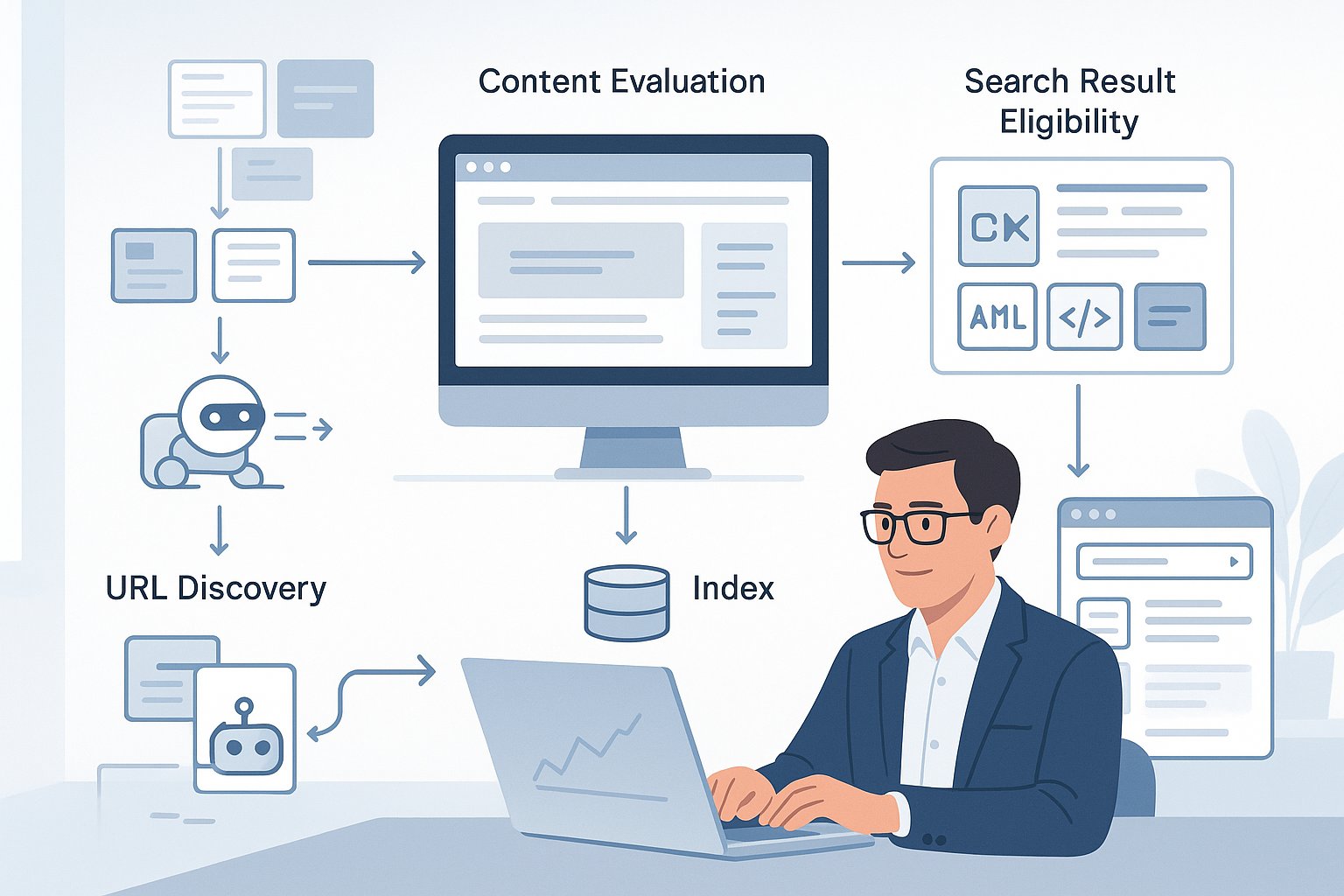
These terms get mashed together a lot, so let's separate them:
- Crawling: a bot discovers and fetches a URL
- Indexing: the content is evaluated and stored
- Serving: the page becomes eligible to appear in search results
A page can be crawled but not indexed. And it can be indexed but barely shown if quality signals are weak.
Signals that influence crawling frequency and indexation
Search engines look at things like:
- Internal links and crawl depth
- XML sitemaps
- Canonicals and robots directives
- Page quality and originality
- Server speed and uptime
- Backlink discovery
- Site authority and freshness
If your page is orphaned, thin, slow, or blocked, even the best seo indexer won't save it.
How an SEO Indexer Works (Mechanisms & Methods)
Common techniques used by indexers (pings, backlink submissions, sitemap pushes, RSS/social, API calls)
Most indexers combine discovery signals rather than one single trick. Common methods include:
- Sending pings to update services
- Pushing XML sitemap URLs
- Publishing RSS updates
- Creating discovery-layer backlinks
- Sending URLs through approved APIs where relevant
- Social or feed syndication signals
Think of it less like a battering ram, more like knocking on several doors at once.
Automation types: web-based, desktop apps, and APIs
You'll generally find three formats:
Type | Best for | Tradeoff |
|---|---|---|
Web-based SaaS | Ease, teams, dashboards | Monthly cost |
Desktop apps | One-time buyers, manual control | Setup and maintenance |
APIs | Agencies, custom workflows | Technical overhead |
For most users, SaaS tools feel easiest. That's where Zindexing stands out, simple workflow, less fiddling.
Limitations: what indexers cannot guarantee (search engine policies, Indexing API restrictions)
No honest provider should promise guaranteed Google indexation. Search engines decide what enters the index. Also, Google's Indexing API is officially intended for limited content types, such as job posting and livestream structured data, not general blog posts. If a tool claims universal API-based indexing for everything, raise an eyebrow... maybe both.
Why Use an SEO Indexer? Benefits, Expectations & Realistic Outcomes
Speeding up indexation vs guaranteeing ranking
A good seo indexer may shorten discovery time. That's useful. But faster indexing does not mean better rankings. Rankings depend on relevance, links, quality, intent match, and competition. Indexing is the ticket to enter the stadium: it doesn't hand you front-row seats.
When an indexer helps most (new pages, backlinks, time-sensitive content)
Indexers tend to help most when you're dealing with:
- Fresh blog posts on newer sites
- Newly built backlinks you want discovered
- Product pages during launches
- Event pages, deals, promos, local campaigns
- Large batches of URLs after a content sprint
If timing matters, using an seo indexer can be a very practical move.
How to Use an SEO Indexer: Step-by-Step Workflow
Pre-launch checklist: make the page indexable (robots, noindex, canonical, schema, quality content)
Before you submit anything, check the basics:
- Page returns 200 OK
- Not blocked by
robots.txt - No accidental
noindex - Canonical points to itself or the intended version
- Internal links exist
- Content is useful, original, and complete
- Structured data is valid where relevant
I've seen people blame the tool when the page was literally noindexed. A classic.
Setting up campaigns: bulk vs single URL, drip-feed, scheduling
Use single-URL submission for priority pages. Use bulk campaigns when you've published at scale. Drip-feed submissions work well when you don't want every URL pushed at once, especially for backlink indexing. Scheduling helps agencies pace campaigns and avoid creating weird, unnatural bursts.
Proxy and IP considerations, rate limits and throttling
If your tool supports proxies, use them carefully. Too much activity from one IP can trigger blocks or failed requests. Respect rate limits, rotate residential or quality datacenter proxies when needed, and throttle campaigns. More aggression isn't always smarter, sometimes it's just louder.
Monitoring and verification: use Search Console, site: search and index checker tools
Track progress with:
- Google Search Console URL Inspection
- The Pages indexing report
site:example.com/page-slugsearches- Third-party index checkers for batches
Search Console remains your most trustworthy source, even if it occasionally feels like it's judging you.
Best SEO Indexer Tools: Comparison & Recommendations
What to compare: success rate, bulk limits, drip-feed, API, proxies, pricing, UI
Don't compare tools on hype alone. Look at:
- Indexation success rate over 7–14 days
- Bulk URL capacity
- Drip-feed controls
- API access
- Proxy support
- Pricing per URL or plan tier
- Reporting clarity
- Ease of use
A clunky tool can waste more time than it saves.
Top categories: free indexers, paid SaaS, desktop apps, open-source (example use-cases)
Here's the practical view:
Category | Best use-case | Watch-outs |
|---|---|---|
Free indexers | Testing, tiny sites | Low reliability, limits |
Paid SaaS | Agencies, publishers, consistent use | Recurring cost |
Desktop apps | Power users who like control | Setup burden |
Open-source | Custom systems, dev teams | Maintenance overhead |
Recommendation: if you want the best balance of simplicity, campaign control, and modern usability, Zindexing is the strongest starting point for most users. If you're technical and enjoy tinkering, APIs or open-source tools may fit better.
Case Studies & Benchmarks: Real Results, Timelines & Metrics
Sample campaign #1: new blog posts, timeline to index
A realistic benchmark: 20 new blog posts on a mid-tier site with decent internal links and sitemap hygiene. Without active submission, maybe 30–50% are indexed in the first week. With an seo indexer plus Search Console submission and homepage links, you may see 60–85% indexed within 3–10 days.
Sample campaign #2: backlink indexing, success rate analysis
Backlink indexing is tougher. Let's say you submit 100 tier-one backlinks. Depending on source quality, crawlability, and platform type, maybe 35–70% get discovered/indexed over 2–4 weeks. Context matters a lot: editorial links on live pages beat buried profile links almost every time.
Troubleshooting: When URLs Don’t Get Indexed
Common causes (crawlability issues, low content quality, penalties)
Usually, non-indexation comes down to one of these:
- Blocked crawling or accidental
noindex - Duplicate or near-duplicate content
- Soft 404 patterns
- Weak internal linking
- Poor content quality
- Slow or unstable server response
- Manual actions or trust issues
Sometimes the page isn't "unseen." It's seen and rejected.
Step-by-step fixes and diagnostics
Try this sequence:
- Inspect the URL in Search Console
- Confirm status code and robots directives
- Review canonical tags
- Improve originality and depth
- Add internal links from crawled pages
- Update sitemap and resubmit
- Use your seo indexer again after fixes
If nothing changes after a few weeks, the quality issue is probably bigger than the indexing issue.
SEO Indexer Pricing, ROI & Choosing the Right Plan
How to estimate costs per URL and expected value
Start with cost per submitted URL, then compare it to potential upside. If indexing a money page could bring even a few qualified visits or one conversion, a modest indexing cost can be justified. For backlinks, calculate whether faster discovery supports rankings enough to matter.
Budget options for agencies vs solo SEOs
A solo SEO may do fine with a smaller monthly SaaS plan or pay-as-you-go credits. Agencies usually need higher bulk limits, API access, user seats, and reporting. In practice:
- Solo users: prioritize ease and low minimum spend
- Agencies: prioritize automation, batching, and reporting consistency
That's another reason Zindexing appeals to both camps.
Legal, Ethical & Safety Considerations for Using Indexers
White‑hat vs black‑hat tactics and risks
Using an seo indexer to submit legitimate pages or surface valid backlinks is one thing. Using spammy networks, junk pages, or manipulative link blasts is another. White-hat usage focuses on discoverability. Black-hat usage tries to manufacture signals at scale, and that's where risk climbs fast.
Privacy, data retention and partner network transparency
Before choosing a provider, ask:
- How long are submitted URLs stored?
- Are campaigns shared with third-party partner networks?
- Is there a data-processing policy?
- Can you delete projects?
If a tool is vague about where your URLs go, that's not "mysterious." That's a red flag.
Integrations & Automation: Connect an SEO Indexer to Your Workflow
APIs, Zapier / webhooks, CMS plugins, and Search Console automation
This is where indexing gets fun, yes, I said fun, let's not overthink it. Advanced users can automate submissions when:
- A CMS publishes a new page
- A sheet receives a batch of URLs
- A link-building campaign finishes
- Search Console exports low-discovery URLs
Useful stack examples include API connections, Zapier or Make workflows, WordPress plugins, webhook triggers, and internal dashboards. If you manage publishing at scale, automation saves real hours.
Advanced Tips & Best Practices to Maximize Indexing Success
Content, technical and link strategies that help indexation
The best indexing hack is still a good page. Help search engines trust and discover your URLs by improving:
- Internal linking from indexed pages
- Original copy and clear intent match
- Fast load times and strong Core Web Vitals
- Schema where appropriate
- Crawlable site architecture
An seo indexer works better when the page already deserves attention.
Drip-feed strategies, pacing and link diversity
For backlinks especially, drip-feed campaigns often look cleaner than giant bursts. Spread submissions across days, mix source types, and avoid creating patterns that scream automation. A slower, more varied campaign can outperform an all-at-once blast that burns bright and fizzles.
Security & Proxy Best Practices for Indexing Campaigns
Choosing proxies, avoiding IP blocks and rotation strategies
If your workflow needs proxies, don't cheap out too hard. Low-quality proxy pools can create more failures than benefits. Look for:
- Stable residential or reputable datacenter proxies
- Rotation controls
- Geographic relevance if needed
- Clear concurrency settings
Keep request rates reasonable, rotate IPs during larger campaigns, and separate risky experiments from main business infrastructure.
SEO Indexer FAQ
How long does indexing usually take?
It varies. Strong pages on healthy sites may index within hours or days. Others take weeks, or never make it in. With a solid seo indexer, proper internal links, and sitemap submission, many pages see movement within 3–14 days.
Can an indexer get penalized or flagged?
A tool itself isn't usually what gets "penalized." The risk comes from how it's used. Aggressive spam tactics, manipulative link schemes, and shady discovery methods can contribute to trouble. Used conservatively, indexers are generally a workflow aid, not a penalty magnet.
Do indexers work for Bing and other search engines?
Often, yes, at least indirectly. Many indexing signals, sitemaps, feeds, and discovery paths can help Bing and other engines too. But support varies by tool and method, so check documentation instead of assuming universal coverage.